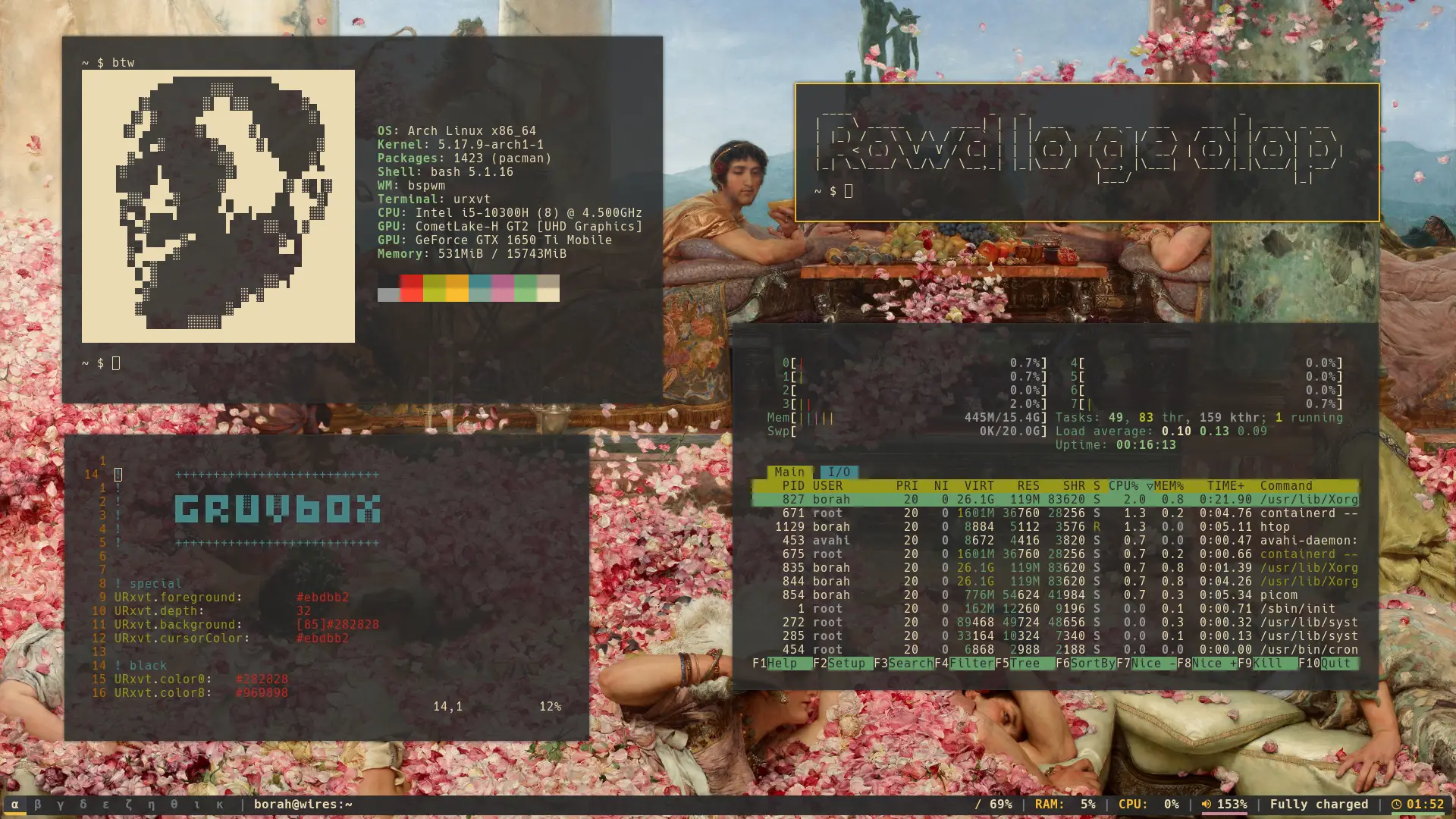
i spent way too many hours tweaking every pixel when i first got bspwm running on arch (almost half a decade as of writing). there’s something addictive about building your own environment from scratch; every keybind, every behavior, it all reflects how you actually work. this is my bspwm + polybar setup, themed in gruvbox because i am boring like that.
as a disclaimer, i haven’t updated my dots for a while, so i’m not sure how it looks on a newer system. you’ll have to figure that out for yourself.
here is the github repo for the same!
bspwm
the bspwmrc file is where it all begins. i used Greek letters for workspaces (α through κ) because I wanted to seem cool and mysterious which in hindsight, is somewhat pretentious(?). 2px borders, 5px gaps, keeps things clean without feeling sparse. focused windows get that gruvbox yellow border, which I find nice.
autostart runs the essentials: sxhkd for hotkeys, picom for smooth transitions, dunst for notifications, feh to cycle through wallpapers, polybar at the top, and a small script that nags me when the battery drops.
sxhkd
this is where bspwm shines. i mapped home row keys for navigation, vim-style because why reach for arrow keys when your hands are already on the home row? super + h/j/k/l moves focus around, add shift to swap windows. super as the modifier keeps everything under your thumb (quite literally).
volume keys work out of the box, 5% increments feel right (at least to me personally). here’s a nice trick: hold shift while adjusting brightness and it triggers redshift at 4500K. no more bleeding eyes at 2am.
urxvt
urxvt because it just works. background at 95% opacity so wallpaper shows through, but text stays readable. Hack Nerd Font handles everything well. i configured all four variants (regular, bold, italic, bold italic) so apps don’t fall back to ugly defaults when they need italics.
polybar
my workspaces on the left, window title (truncated so it doesn’t hog space) next to it. right side has filesystem, memory, cpu, volume, battery with charging animations, and time in 24-hour format. the gruvbox palette ties it all together (yet again).
picom and dunst
picom handles shadows, fading, inactive opacity so unfocused windows step back. Nothing flashy, just enough to feel polished. VSync enabled, xrender backend for broad hardware support.
dunst sits in the top-right corner with the yellow frame. normal ones timeout after 10 seconds, critical ones stick around until you deal with them. blends in with the rest of the theme.
things i still think about
an install script would be nice. network modules in polybar would be handy. theme switching for variety. the scripts directory I mention isn’t in the repo. wayland isn’t happening since bspwm is X11 only, which is fine by me.
took a while (couple of years) to get right, but the keyboard-driven workflow pays off. the consistent theming makes everything feel like one environment instead of a bunch of tools duct-taped together. if you want a reference bspwm setup with polybar and picom, this should give you a solid starting point.
you’ll need Hack Nerd Font (any other nerd font should do tbf) and the packages listed in the README of the project repo.
if you end up using any of this, let me know. or don’t. either way, thanks for reading.